Purchase order software for startups and a purchase order system for startups that outgrew card approvals
Procurer is purchase order software for startups that need approval before anyone commits company money, from 149 USD a month per company. Department owners review requests against budgets, approved purchases become POs, and receiving records show what arrives before finance exports approved bills to QuickBooks Online or Xero. It fits a COO, head of finance, controller or first operations hire at a US Series A or B startup with 20 to 150 people. Keep corporate cards for everyday payments and put vendor commitments through a purchasing process.
On this page
- 01What is the best purchase order software for startups?
- 02The signals that cards stop being enough
- 03From request to an approved bill
- 04Check department budgets before committing cash
- 05Keep evidence of who approves vendor purchases
- 06Keep cards and add a rule for vendor commitments
- 07Compare the purchasing options for a startup
- 08Choose a plan for the people who actually use it
- 09Use a week as your rollout plan
- 10FAQ
What is the best purchase order software for startups?
The best purchase order software for a startup shows the department budget before commitment and keeps the approval, PO and receipt together. Procurer fits teams that want this process at a published company price. Team covers requests, receiving and accounting export; Business adds conditional approval rules and three-way matching.
The signals that cards stop being enough
Corporate cards work well while a small founding team knows every vendor. Around Series A or B, buying spreads across engineering, sales, marketing and operations. A receipt explains a charge, but it does not explain why the company agrees to the expense.
- SaaS subscriptions accumulate, and separate teams buy overlapping tools without reviewing the existing stack.
- Contractor invoices arrive without a PO, an agreed scope or a department owner who accepts the work.
- Laptop orders reach finance after checkout, with no record of who approves the equipment purchase.
- An agency starts work while the quote and approval remain in separate chat threads.
- The board asks for budget versus actual by department, but the spreadsheet misses open vendor commitments.
- Auditors ask who approves vendor purchases, and finance searches messages for evidence.
A PO process captures the decision while the company can still change it. Finance reviews the scope and cost before the vendor starts work or ships equipment.
From request to an approved bill
1. The employee raises a request with the supplier, department, purpose and cost. Attach the hardware quote, agency scope or annual SaaS proposal so the approver reviews the actual commitment.
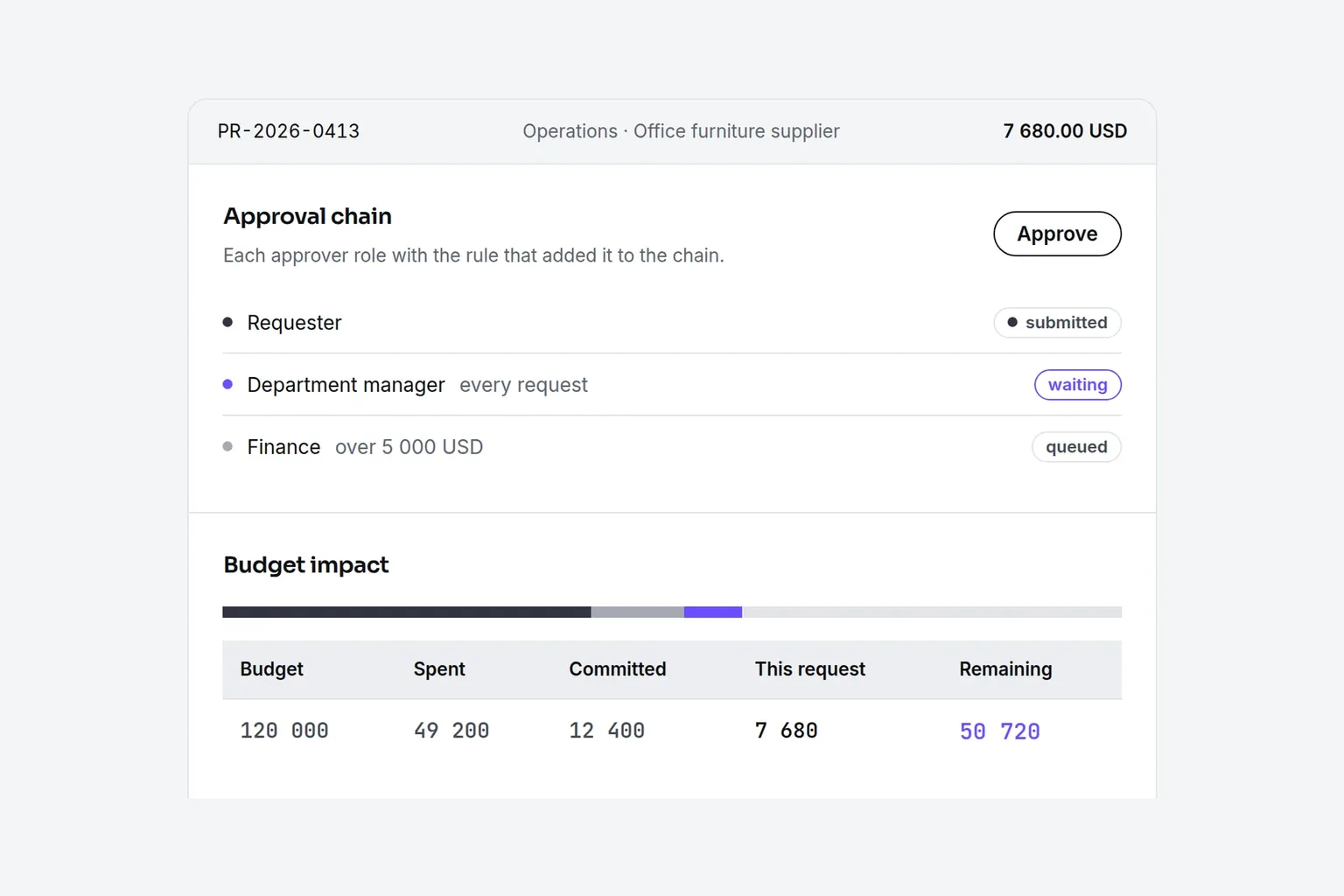
2. The department owner reviews the request and available budget. Team includes up to 2 approval steps. Business adds rules by amount and unlimited approval steps for purchases that need additional finance review.
3. After approval, create the PO and use it as the agreed reference with the vendor. Include the hardware quantities, contractor deliverables or subscription term so the invoice has something specific to match.
4. Record delivered equipment or accepted services against the order. Finance reviews the invoice and exports the approved bill to QuickBooks Online or Xero. Business adds three-way matching across the PO, receipt and invoice.
Use purchase approval workflows to define who decides before buying and preserve the decision when managers change.
Check department budgets before committing cash
Start with the department allowances in your runway plan. Engineering, sales, marketing and operations each need an owner and a purchasing budget that finance can explain. Procurer includes department budgets on every plan, with the remaining balance visible when a request is reviewed. That puts the budget conversation before the purchase.
Treat an annual SaaS contract as a commitment for its full term, even if the vendor offers monthly payments. Attach the proposal and explain which team uses the tool. For contractors and agencies, make the scope and acceptance criteria part of the request so a larger invoice does not become the first discussion about extra work.
Business adds project and GL budgets, budget transfers and spend analytics. Use those controls when a launch cuts across departments or finance needs a closer view of purchasing by account. Keep payroll, cash balances and the full runway forecast in your financial model. Purchasing records supply evidence for that model; a PO budget alone does not calculate company burn or months of runway.
Keep evidence of who approves vendor purchases
An audit trail helps finance answer who requests a purchase, who approves it and when the approval happens. Procurer includes an audit trail on Team, alongside attachments and custom fields. Keep the vendor proposal with the request so the record explains both the decision and the amount.
For a first financial audit or SOC 2 review, agree with your auditors which purchasing evidence they need. A consistent approval record helps support that evidence. It does not establish SOC 2 compliance or certify Procurer. Document your policy, assign approvers and review exceptions as part of the operating process.
If your requirements include SAML SSO, SCIM, approval matrices or segregation of duties rules, those belong to Enterprise. Select those controls because your policy requires them, rather than assuming every startup needs the highest plan.
Keep cards and add a rule for vendor commitments
Keep Ramp, Brex or Amex for small recurring purchases within your card policy. Use POs above a threshold that finance sets, and for hardware batches, contractors, agencies and annual SaaS agreements regardless of payment method. Payment by card does not remove the need to approve the underlying commitment.
Publish a short buying policy that names the requester, approver and person responsible for confirming delivery. For services, confirmation means the owner accepts the agreed work. For laptops, it means the equipment arrives. Finance then compares the invoice with the order and the receiving record, using three-way matching on Business.
Procurer does not connect to Ramp, Brex or Amex. It exports approved bills to accounting, and the card platform keeps handling card payments. Assign finance the reconciliation so a card purchase does not also enter accounting as an unpaid supplier bill.
Compare the purchasing options for a startup
Card controls can include approval before a charge. The question is whether they also cover the vendor commitment, receipt and invoice. Compare those steps before adding another system.
| Option | Price visibility | Contract | Setup time | Approvals before spend | Receiving and matching | Best for |
|---|---|---|---|---|---|---|
| Procurer | Published company plans from 149 USD a month | Monthly or yearly | Self-directed setup; pilot plan below | Requests before purchase; conditional rules on Business | Receiving on Team; three-way matching on Business | Startups needing POs and accounting export at a known price |
| Card-only approvals | Existing card plan and fees | Card provider terms | Keep the existing process | Available for card spend if configured | Usually manual outside the card process | Small teams with mostly card purchases |
| Card platform procurement add-on | Ramp procurement price is unpublished | Confirm add-on term in the quote | Configure intake and workflows with the provider | Available through procurement workflows | Ramp lists PO receiving and three-way matching | Teams prioritizing cards and purchasing in one platform |
| Quote-only P2P suite | Sales quote from Procurify, Zip or Coupa | Annual contracts through sales; confirm terms | Scoped implementation with the vendor | Configurable purchasing approvals | Confirm matching and modules in the proposal | Complex intake and broader procurement requirements |
- Procurer
- Price visibilityPublished company plans from 149 USD a monthContractMonthly or yearlySetup timeSelf-directed setup; pilot plan belowApprovals before spendRequests before purchase; conditional rules on BusinessReceiving and matchingReceiving on Team; three-way matching on BusinessBest forStartups needing POs and accounting export at a known price
- Card-only approvals
- Price visibilityExisting card plan and feesContractCard provider termsSetup timeKeep the existing processApprovals before spendAvailable for card spend if configuredReceiving and matchingUsually manual outside the card processBest forSmall teams with mostly card purchases
- Card platform procurement add-on
- Price visibilityRamp procurement price is unpublishedContractConfirm add-on term in the quoteSetup timeConfigure intake and workflows with the providerApprovals before spendAvailable through procurement workflowsReceiving and matchingRamp lists PO receiving and three-way matchingBest forTeams prioritizing cards and purchasing in one platform
- Quote-only P2P suite
- Price visibilitySales quote from Procurify, Zip or CoupaContractAnnual contracts through sales; confirm termsSetup timeScoped implementation with the vendorApprovals before spendConfigurable purchasing approvalsReceiving and matchingConfirm matching and modules in the proposalBest forComplex intake and broader procurement requirements
Card-only approvals can be enough below about 20 people when buying stays simple and one person sees every commitment. Ramp procurement is an add-on on Plus or Enterprise with an unpublished price in the October 2026 research. It can suit an existing Ramp customer seeking one platform. A quoted suite can justify its contract and setup when procurement complexity warrants a broader project.
Choose a plan for the people who actually use it
Procurer prices plans per company, not per seat. Count everyone who requests, approves or receives purchases, then check order volume, legal entities and required features. The examples assume the whole startup needs access.
| Startup size | Plan | Monthly or yearly price | Capacity and useful controls |
|---|---|---|---|
| 20 people | Team | 149 USD a month or 888 USD billed yearly | 25 users, 250 orders a month, 2 approval steps, 1 entity; requests, department budgets, receiving, audit trail and QuickBooks Online or Xero export |
| 60 people | Business | 299 USD a month or 1 788 USD billed yearly | 100 users, 1 500 orders a month, unlimited approval steps, 2 entities; amount rules, three-way matching, invoice inbox, project and GL budgets, analytics and approvals in chat |
| 150 people | Scale | 699 USD a month or 4 188 USD billed yearly | 300 users, unlimited orders, 5 entities; Business controls plus SSO, custom roles, contracts, supplier portal, supplier onboarding, RFQs, API and NetSuite or Sage export |
- 20 people
- PlanTeamMonthly or yearly price149 USD a month or 888 USD billed yearlyCapacity and useful controls25 users, 250 orders a month, 2 approval steps, 1 entity; requests, department budgets, receiving, audit trail and QuickBooks Online or Xero export
- 60 people
- PlanBusinessMonthly or yearly price299 USD a month or 1 788 USD billed yearlyCapacity and useful controls100 users, 1 500 orders a month, unlimited approval steps, 2 entities; amount rules, three-way matching, invoice inbox, project and GL budgets, analytics and approvals in chat
- 150 people
- PlanScaleMonthly or yearly price699 USD a month or 4 188 USD billed yearlyCapacity and useful controls300 users, unlimited orders, 5 entities; Business controls plus SSO, custom roles, contracts, supplier portal, supplier onboarding, RFQs, API and NetSuite or Sage export
A smaller team can still need Business for matching or conditional rules. Enterprise costs 1 299 USD a month or 7 788 USD billed yearly and removes the user, order and entity limits. Team also includes suppliers, attachments, custom fields and CSV import/export. Business adds catalogs, multi-currency, budget transfers and an onboarding session. Review the full company pricing and plan limits before choosing.
Use a week as your rollout plan
Treat a week as a focused rollout target, with finance owning the policy and operations owning adoption. Start with new purchases rather than reconstructing every old card charge.
1. At the start of the week, agree on the PO threshold, exceptions and department approvers. Identify the laptop, agency, contractor and SaaS purchases that need requests before commitment.
2. Add suppliers and department budgets from your finance plan. Use CSV import where useful, and keep the request fields focused on purpose, scope, owner and cost.
3. Pilot the process with an actual purchase. Check that the approver has the quote and budget context, then record receipt or service acceptance and review the bill.
4. Test an approved bill export with your bookkeeper before expanding access. Follow the QuickBooks Online export workflow, or use the Xero export, then publish the buying policy to department leads.
Review unclear ownership and unnecessary approval steps before expanding the pilot.
Do startups need purchase order software?
Yes, when vendor commitments outgrow informal approval. A small founding team can manage with cards and a clear policy, but hardware orders, contractor invoices and annual software contracts need a shared record. Purchase order software puts approval before the commitment and gives finance evidence of what the company agrees to buy.
What is the best purchase order system for startups?
The best system fits your purchasing process, accounting workflow and budget. Procurer suits startups that need requests, approvals, POs, receiving and approved bill export at a published company price. A card platform add-on can fit teams prioritizing one card ecosystem, while a larger suite suits more complex procurement requirements.
How much does purchase order software cost for a startup?
Procurer starts at 149 USD a month per company on Team, or 888 USD billed yearly. Business costs 299 USD monthly or 1 788 USD yearly. Scale costs 699 USD monthly or 4 188 USD yearly. Choose by user accounts, order volume, entities and required controls rather than headcount alone.
Can I use Ramp or Brex instead of purchase order software?
Yes, if card controls cover your buying process. Check whether your plan handles vendor commitments, receiving and invoice matching as well as card approval. Ramp procurement is a separately priced add-on on Plus or Enterprise. Keep cards alongside Procurer when you need a dedicated PO record for supplier purchases.
Does Procurer integrate with QuickBooks Online and Xero?
Yes, through approved bill export to QuickBooks Online and Xero on every plan. Procurer handles the purchase request, approval, PO and receiving record before finance exports the bill. Finance exports approved bills from Procurer into the ledger rather than relying on a live two-way sync. Business adds three-way matching before bills reach accounting.
When should a startup start using purchase orders?
Start when finance needs to approve a vendor commitment before it happens, rather than explain it afterward. Common triggers include hardware batches, contractor scopes, agencies, annual SaaS contracts and auditor requests for approval evidence. Set a threshold and exceptions in your policy, then apply the process to new purchases.
Approve the commitment before the money leaves
Create your account, add department budgets and put the next vendor purchase through a request, approval and PO. Try the demo to follow the process before choosing a plan.