Purchase requests, approvals, POs and invoice matching in one place. Every purchase is approved and checked against budget before the money is committed.
Purchase request readyPR-2026-0412
SpentCommittedThis requestLeft after it
Priced per company, not per seat. Your data stays yours, export it any time.
Bills export for QuickBooks, Xero, NetSuite, Sage Intacct
SSO and audit log on Scale and Enterprise
For the CFO
Spend control your CFO and your auditor can both read
Procurer is built for the person who signs off the budget. It does not ask you to trust a savings promise. It changes where purchase decisions happen.
Maverick spend stops at the request, because nothing becomes a purchase order without the approvals your rules require.
Month-end close stops waiting on missing POs and receipts, because each invoice arrives already tied to both.
Your auditor gets a full trail for every purchase: who asked, who approved, what was ordered, what arrived and what was billed.
Before
Approvals by email, often after the order is placed
Purchase orders written in Word or not at all
Invoices keyed in by hand and checked from memory
Budget position known at month end
Supplier details spread across inboxes
With Procurer
Rule-based approvals on the request, before the order
Purchase orders generated from the approved request
Invoices matched to the PO and the receipt
Remaining budget shown on every request
One supplier record with terms and documents
Route a purchase request
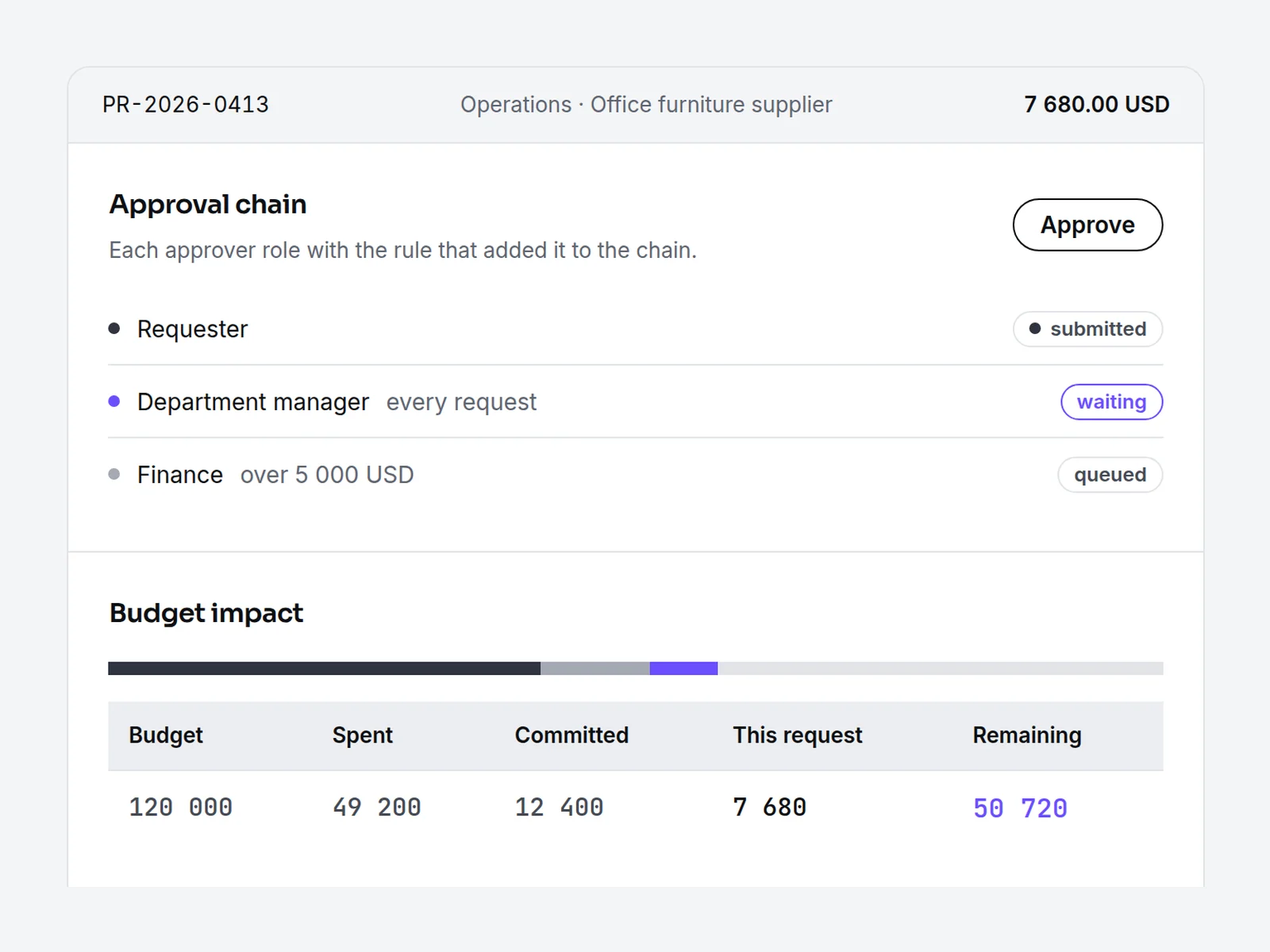
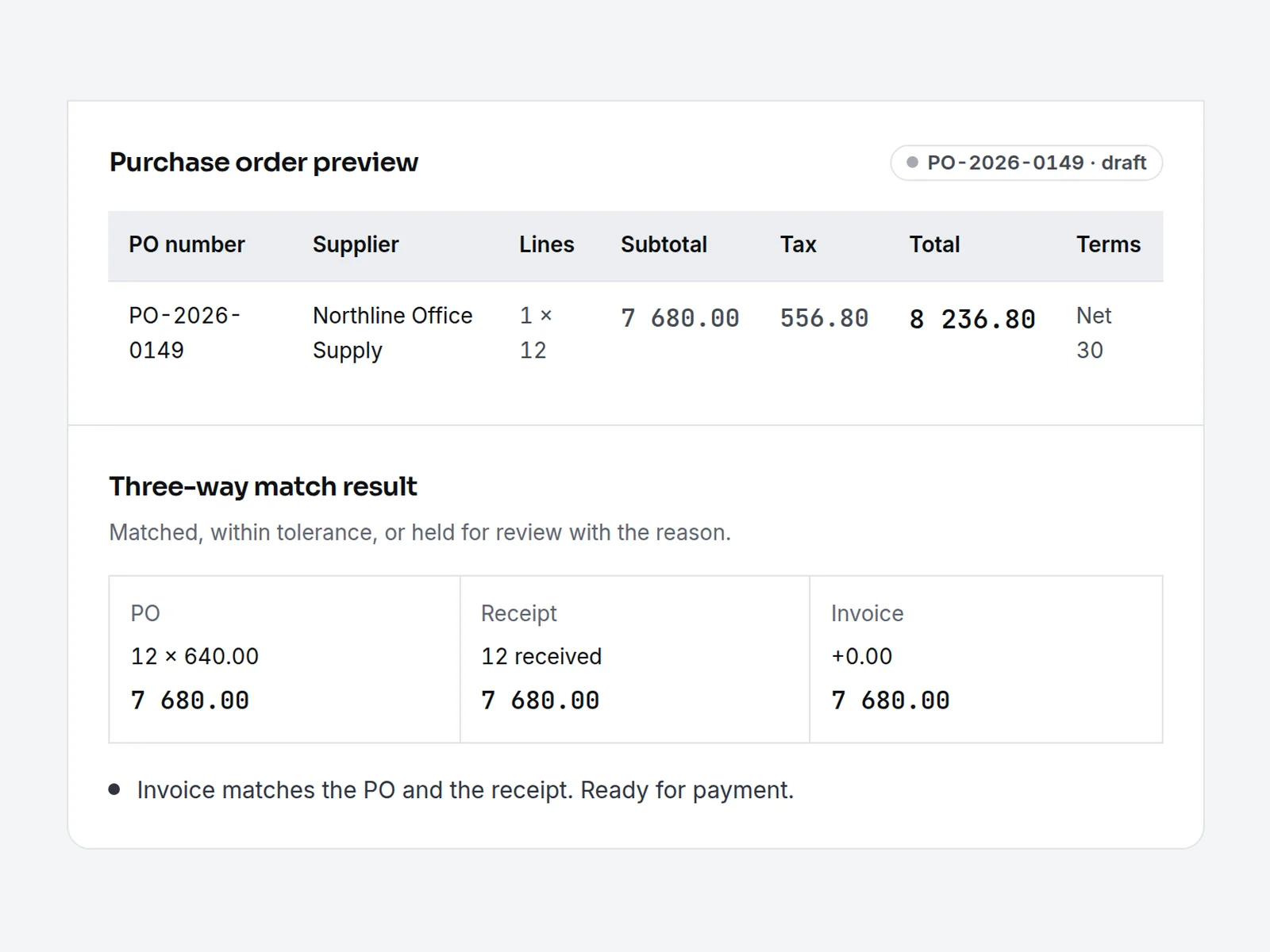
Pick a department, a supplier and an approval policy. Procurer builds the approval chain, checks the budget, drafts the PO and matches the invoice, right on this page.
Choose a department and enter a quantity and unit price to route the request.
Approval chain
Requestersubmitted
Budget impact
Budget
Spent
Committed
This request
Remaining
Budget
Spent
Committed
This request
Remaining
Purchase order preview
Supplier
Lines
Subtotal
Tax
Total
Terms
Supplier
Lines
Subtotal
Tax
Total
Terms
Three-way match
PO
Receipt
Invoice
Set up your own suppliers, departments and approval rules in your workspace.
Compare
Procurement software between spreadsheets and enterprise suites
Mid-size companies usually sit between two options that do not fit. Here is how they compare with Procurer.
Criteria
Spreadsheets and email
Enterprise suites
Procurer
Time to go live
Immediate, with no control
Long, consultant-led project
Days, with templates and CSV import
Pricing model
Staff time
Quoted per seat or module
Flat price per company tier
Approvals
Email threads
Configurable, set up by specialists
Rules by amount, department and category
Three-way match
Manual
Included
Included from the Business plan
Accounting
Rekeying
Usually a custom integration
Bills import files for QuickBooks Online, Xero, NetSuite, Sage Intacct
Who can raise requests
Whoever emails finance
Licensed seats
Every employee within the plan
Time to go live
Spreadsheets and emailImmediate, with no controlEnterprise suitesLong, consultant-led projectProcurerDays, with templates and CSV import
Pricing model
Spreadsheets and emailStaff timeEnterprise suitesQuoted per seat or moduleProcurerFlat price per company tier
Approvals
Spreadsheets and emailEmail threadsEnterprise suitesConfigurable, set up by specialistsProcurerRules by amount, department and category
Three-way match
Spreadsheets and emailManualEnterprise suitesIncludedProcurerIncluded from the Business plan
Accounting
Spreadsheets and emailRekeyingEnterprise suitesUsually a custom integrationProcurerBills import files for QuickBooks Online, Xero, NetSuite, Sage Intacct
Who can raise requests
Spreadsheets and emailWhoever emails financeEnterprise suitesLicensed seatsProcurerEvery employee within the plan
Use cases
Procurement software that works before the money is spent
Most companies find out about a purchase when the invoice arrives. Procurer moves control to the start: the purchase request.
01
Approve before you spend
Approvals happen on the request, not the invoice. The right people see each purchase while it can still be changed or stopped.
02
Know what is left in every budget
Every request shows what is left in the department budget, with open commitments already subtracted. No one has to ask finance.
03
Pay only what matches
Nothing is approved for payment until the purchase order, the goods receipt and the supplier invoice match line by line.
Most companies are running in days. You import suppliers from a CSV, pick approval rules from templates, set department budgets and pick the bills file format of your accounting system. Business and higher plans include an onboarding session.
Do requesters count as paid seats?
No. Procurer is priced per company tier. Each plan includes a number of user accounts (25, 100 or 300), and requesters, approvers and finance all use the same pool, so there is no separate charge per requester.
Which accounting systems work with Procurer?
Procurer exports approved purchase orders as a bills import file: QuickBooks Online and Xero on every plan, NetSuite and Sage Intacct on Scale and Enterprise. You import the file in your accounting program, so no bill is keyed twice. There is no live connection, and Procurer never asks for your accounting or bank login.
Can suppliers receive POs by email?
Yes. Every purchase order goes to the supplier as a PDF by email, with your terms. On Scale, suppliers can also confirm POs and upload invoices in the supplier portal.
How does three-way matching handle partial deliveries?
Each receipt is recorded against the PO lines. An invoice is matched only against what has actually arrived, so a supplier who bills for 10 units after delivering 8 is held for review, while the 8 received units can be paid.
Can we have different approval rules per department?
Yes. Rules can depend on department, amount, category, project and supplier. Team supports up to 2 approval steps, Business and higher plans have unlimited steps and conditional rules.
Can we import our suppliers and open POs?
Yes. Suppliers and open purchase orders come in from a CSV file. On Enterprise, we also migrate your historical POs and supplier records.
What happens to our data if we cancel?
Your data stays yours. You can export requests, purchase orders, suppliers and invoices in CSV at any time, including after you decide to cancel.
Is there a free version?
No. You can try the full approval flow in the live demo without signing up, and every plan is month to month, so you can cancel any time.
Can we pay by invoice?
Yes, on Enterprise with annual billing. We accept your purchase order and complete your vendor forms. Other plans are billed monthly or yearly by card.
Put every purchase through one approval path.
Set up your workspace, import your suppliers and route your first request today.