Purchase order software for multi-location businesses and centralized purchasing across sites
Procurer is purchase order software for US businesses that buy for several locations at once: regional offices, clinics, branches, stores, warehouses, job sites or plants. Each location raises requests, the right manager approves them against that site's budget, the PO goes to the supplier with the location's ship-to address, the people on site receive what arrived, and finance matches the invoice before it is paid. Head office sees every open order and every dollar in one place. Plans are priced per company, not per seat or per location, from 149 USD a month.
On this page
- 01What is the best purchase order software for a multi-location business?
- 02Why purchasing breaks once you open the third location
- 03Purchase orders with the right ship-to address for every location
- 04Site approvals and budgets set once by head office
- 05Receiving at each location, line by line
- 06One accounts payable team, invoices from every site matched
- 07Same supplier, same price, at every location
- 08Several locations, several legal entities
- 09A 12 location services company from request to payment
- 10Which plan fits a multi-location business
- 11Multi-location purchasing options compared
- 12How to roll out purchase orders across every location
- 13FAQ
What is the best purchase order software for a multi-location business?
The best purchase order software for a multi-location business lets every site order on its own while head office keeps one set of rules: each request carries its location and ship-to address, routes to that site's approver, checks that site's budget, is received by the people who signed for the delivery, and is matched to the invoice centrally. Procurer does this on every plan, with up to 5 legal entities on Scale.
Why purchasing breaks once you open the third location
With one office, the owner or the controller sees every purchase. With three, five or twenty locations, purchasing splits into as many small habits as there are site managers, and finance only finds out at month end.
- Each location orders from its own suppliers at its own prices, so the same box of gloves or the same printer toner costs 20 percent more in one branch than in the next.
- A site manager orders by phone or email, the supplier ships to the wrong address, and nobody can say which location the invoice belongs to.
- Deliveries are signed for by whoever is on shift, and accounts payable at head office pays the full invoice because nobody told them only half the order arrived.
- Budgets exist in a spreadsheet at head office, but the person ordering at the site cannot see them, so overspend is discovered after the money is gone.
Purchase order software fixes this by making the location part of every request and every PO, and by putting the approval and the receipt in the hands of the people at each site, under rules set once for the whole company.
Purchase orders with the right ship-to address for every location
In Procurer you add each location once, with its name and delivery address, under Settings and Locations. Every plan includes this. When someone raises a request they pick their location, and the purchase order that comes out of the approval takes that location with its address as the ship-to. The supplier sees exactly where to deliver, the receiving team at that site sees the order waiting for them, and accounts payable sees which location the invoice belongs to.
- Archive a location you close without losing its order history.
- Every PO shows its location and ship-to address on the order and in the PDF the supplier receives.
- Requesters can order for a different site when one location buys for another, and the PO still ships to the right address.
More on purchase order management.
Site approvals and budgets set once by head office
Most multi-location companies set each site up as a department in Procurer, or a department per site and function when a location is large, such as Dallas operations and Dallas maintenance. Each department has its approver and its budget. On Team, requests route by amount and department with up to two approval steps, so the Dallas branch manager approves Dallas orders and anything above your threshold goes to the regional director. On Business, approval rules can also use the category, the supplier and the project, with as many steps as your policy needs, and budgets can be split by project and GL account.
- The approver sees the quote, the attachments and what is left on the site budget before deciding.
- Approvals work from email and the browser on every plan, and on Business also from Slack or Microsoft Teams, which matters for managers who spend the day on the floor, not at a desk.
- Budget transfers between departments on Business let a regional controller move money from a quiet branch to a busy one with a record of who moved it and why.
See how purchase order approval software handles thresholds.
Receiving at each location, line by line
The people who sign for deliveries are at the sites, not at head office, so receiving has to happen where the boxes arrive. In Procurer whoever is on site opens the PO on a phone or a laptop, records the quantity received on each line and attaches a photo of the packing slip. A 40 line order for a new branch can arrive in four shipments, and the PO stays open until the last line is in. Receiving is included on every plan, and plans include 25, 100 or 300 user accounts, so adding a receiver at each location does not add a seat fee.
One accounts payable team, invoices from every site matched
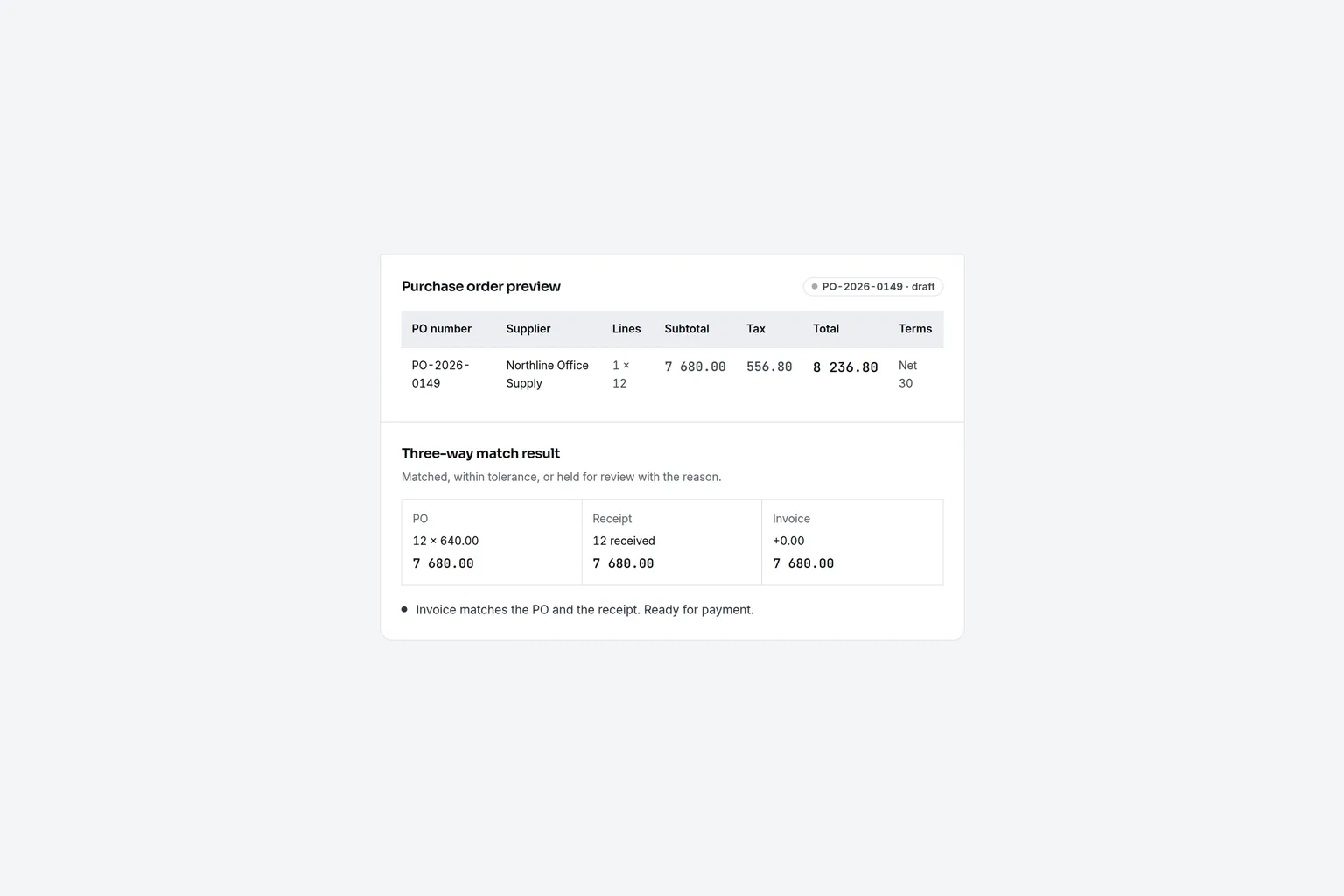
Multi-location companies almost always pay suppliers centrally. From Business, Procurer checks every supplier invoice against the PO and the quantities each site actually received before it can be approved for payment, with price and quantity tolerances you set company wide or by category. Suppliers can email invoices to an invoice inbox, and each exception says why it was held: price above the PO, more than the site received, or no PO at all. Approved bills export to QuickBooks Online or Xero on every plan, as a CSV, and to NetSuite or Sage Intacct on Scale. Read how three-way matching software works.
Same supplier, same price, at every location
Price drift between sites is the quiet cost of decentralized buying. On Business, catalogs hold your agreed items per supplier with SKU, unit and price, so a requester in Phoenix and one in Charlotte both pick the same janitorial supplies at the contracted price instead of typing in whatever the supplier quoted locally. Spend analytics on Business shows spend by department, supplier and category, so head office can see which sites buy off contract. On Scale, one RFQ goes to several suppliers for a company wide contract, and the supplier portal lets suppliers confirm orders, propose ship dates and upload invoices. See vendor management software.
Several locations, several legal entities
Many multi-location groups run each region, franchise or acquired business as its own legal entity with its own books. Procurer includes 1 legal entity on Team, 2 on Business, 5 on Scale and unlimited on Enterprise. Each entity keeps its own purchase orders and exports, and on Scale intercompany purchases between your entities are recorded on both sides. If you have one company with many sites, you need locations, not entities, and every plan has unlimited locations.
A 12 location services company from request to payment
A facilities services company runs 12 branch offices across Texas, Arizona and Colorado, with about 180 staff. Each branch buys uniforms, small tools, vehicle parts and office supplies. Before Procurer, branch managers ordered by phone and the controller in Austin got invoices with no PO and no idea which branch they were for.
1. The Phoenix branch manager requests 30 safety vests and 10 hard hats from the company's catalog supplier, 1 140 USD in total, ship-to Phoenix. The request shows 2 600 USD left on the Phoenix operating budget this month.
2. The amount is under the 2 500 USD regional threshold, so only the Phoenix manager's regional director approves, from email, the same morning.
3. Procurer sends the PO to the supplier with the Phoenix address.
4. The supplier ships the vests now and the hard hats next week. The Phoenix office receives 30 vests against the PO on a phone.
5. The invoice for the full order arrives at the invoice inbox. Three-way matching holds the hard hat lines until Phoenix receives them, then the bill goes into the next QuickBooks Online export.
At month end the controller sees spend by branch and supplier in one report and knows which branches bought outside the catalog.
Which plan fits a multi-location business
Plans are per company. Opening a new location does not change the price, and neither does adding a receiver or a manager at that site, until you reach the user limit of your plan.
| Company | Plan | Price | What you get |
|---|---|---|---|
| A few locations, up to 25 people who request, approve or receive | Team | 149 USD a month, or 888 USD a year billed yearly | Unlimited locations with ship-to, requests, POs, approvals by amount and department, receiving, department budgets, QuickBooks Online or Xero export, up to 250 POs a month |
| Growing group, up to 100 users | Business | 299 USD a month, or 1 788 USD a year billed yearly | Approval rules by category and vendor, three-way matching, invoice inbox, supplier catalogs, budgets by project and GL, budget transfers, spend analytics, 2 legal entities, up to 1 500 POs |
| Regional or multi-entity group, up to 300 users | Scale | 699 USD a month, or 4 188 USD a year billed yearly | Up to 5 legal entities, intercompany, RFQs, supplier portal and onboarding, contracts, SSO, API, NetSuite or Sage Intacct export, unlimited POs |
- A few locations, up to 25 people who request, approve or receive
- PlanTeamPrice149 USD a month, or 888 USD a year billed yearlyWhat you getUnlimited locations with ship-to, requests, POs, approvals by amount and department, receiving, department budgets, QuickBooks Online or Xero export, up to 250 POs a month
- Growing group, up to 100 users
- PlanBusinessPrice299 USD a month, or 1 788 USD a year billed yearlyWhat you getApproval rules by category and vendor, three-way matching, invoice inbox, supplier catalogs, budgets by project and GL, budget transfers, spend analytics, 2 legal entities, up to 1 500 POs
- Regional or multi-entity group, up to 300 users
- PlanScalePrice699 USD a month, or 4 188 USD a year billed yearlyWhat you getUp to 5 legal entities, intercompany, RFQs, supplier portal and onboarding, contracts, SSO, API, NetSuite or Sage Intacct export, unlimited POs
Most groups with more than five locations choose Business, because catalog pricing and three-way matching are where the money comes back. See full procurement software pricing.
Multi-location purchasing options compared
An honest view of what multi-location companies usually weigh.
| Option | Good for | Limits for purchasing across sites |
|---|---|---|
| Email, phone and a shared spreadsheet | Two or three sites with one buyer | No approval record, no ship-to on the order, no receiving, invoices hard to assign to a site |
| Company cards per location | Small, urgent local buys | Money is spent before approval, no receiving, coding happens after the fact |
| Point of sale or inventory system with purchasing | Stores reordering stock for resale | Built for inventory replenishment, rarely covers supplies, services, IT and capital buys or approval chains |
| ERP purchasing module | Companies that already run every site in an ERP | Site managers and receivers often need paid ERP seats, approval routing is basic in many mid-market ERPs |
| Procurer | 20 to 300 staff across several locations who need approved POs, site receiving and central matching | No inventory counts, stock reordering or payments; it exports bills to your accounting |
- Email, phone and a shared spreadsheet
- Good forTwo or three sites with one buyerLimits for purchasing across sitesNo approval record, no ship-to on the order, no receiving, invoices hard to assign to a site
- Company cards per location
- Good forSmall, urgent local buysLimits for purchasing across sitesMoney is spent before approval, no receiving, coding happens after the fact
- Point of sale or inventory system with purchasing
- Good forStores reordering stock for resaleLimits for purchasing across sitesBuilt for inventory replenishment, rarely covers supplies, services, IT and capital buys or approval chains
- ERP purchasing module
- Good forCompanies that already run every site in an ERPLimits for purchasing across sitesSite managers and receivers often need paid ERP seats, approval routing is basic in many mid-market ERPs
- Procurer
- Good for20 to 300 staff across several locations who need approved POs, site receiving and central matchingLimits for purchasing across sitesNo inventory counts, stock reordering or payments; it exports bills to your accounting
If your locations are buildings you manage for owners, see purchase order software for property management.
How to roll out purchase orders across every location
1. Add your locations with their delivery addresses.
2. Create a department for each site, with its manager as approver and its monthly budget.
3. Copy your purchasing policy into approval rules, with the regional director or controller above your threshold.
4. Import suppliers, GL accounts and, on Business, catalogs for your top suppliers from a CSV.
5. Launch one location first for a week, then invite the others. Most groups are live within two weeks.
What is the best purchase order software for multiple locations?
The best purchase order software for multiple locations puts the location and its ship-to address on every request and PO, routes approval to that site's manager, checks that site's budget, lets the site receive deliveries and matches invoices centrally. Procurer does this from 149 USD a month per company, with unlimited locations on every plan.
How do you manage purchasing for multiple locations?
Set purchasing rules once at head office and let each site follow them. Each location raises requests in one system, approvals route by amount and site, purchases come from agreed suppliers at catalog prices, the site receives what arrived, and accounts payable pays only invoices that match. That keeps local speed with central control.
Should purchasing be centralized or decentralized for a multi-location business?
Most growing multi-location businesses do best with a hybrid. Head office sets suppliers, prices, budgets and approval thresholds, while each location requests, approves small purchases and receives its own deliveries. Purchase order software makes that hybrid work, because the rules are enforced in the tool instead of depending on each site manager.
Can each location have its own budget and approver?
Yes. In Procurer you set each location up as a department with its own approver and budget on every plan. Requesters see what is left before they submit, and approvers see it before they decide. On Business, budgets can also run by project and GL account, and money can be moved between sites with a recorded budget transfer.
Does Procurer charge per location?
No. Procurer is priced per company: 149 USD a month on Team, 299 USD on Business and 699 USD on Scale, or half that per month billed yearly. Locations are unlimited on every plan. What changes the plan is the number of user accounts, purchase orders a month and legal entities.
Can Procurer handle several legal entities?
Yes. Team includes 1 legal entity, Business 2, Scale 5 and Enterprise unlimited. Each entity keeps its own purchase orders and exports to its own books, and on Scale intercompany purchases between your entities are recorded for both sides.
What PO matching solutions work for multi-location businesses?
A PO matching solution for a multi-location business has to match each invoice to the PO and to what that specific location received. Procurer Business does three-way matching with price and quantity tolerances, holds invoices for lines a site has not received yet and keeps the location on every PO, for 299 USD a month per company.
What procurement software works for companies with multiple locations or branches?
Procurement software for companies with multiple locations or branches needs unlimited locations with ship-to addresses, approvals and budgets per branch, receiving at each site and one central view of spend. Procurer includes all of these on every plan from 149 USD a month, and Business adds catalogs, three-way matching and spend analytics by branch.
What's the best solution for tracking purchasing analytics across multiple regions?
The best solution tracks spend at the moment of approval, not from card statements at month end. In Procurer you set each region or site up as a department, every request and PO carries it, and spend analytics on Business shows committed and invoiced spend by department, supplier, category and month in one view. It costs 299 USD a month per company with unlimited locations.
What is the best procurement software for multi-location franchise businesses?
For franchise groups the best procurement software also keeps each unit's legal entity and the brand-approved suppliers. Procurer gives every unit a budget and approver, catalogs for approved suppliers on Business and up to five legal entities on Scale. See purchase order software for franchises for the full setup.
How to roll out business purchasing software for multi-location sites?
Start with the vendors that every site uses, such as supplies, repairs and maintenance. Add each location with its ship-to address and budget, name one approver per site, and put those vendors on POs first. Turn on receiving after two weeks, then invoice matching. Expand to the remaining vendors once the first group runs cleanly.
What is the best software integration for smooth purchasing across multiple locations?
For most US multi-site companies the integration that matters is accounting. Procurer exports approved bills to QuickBooks Online or Xero, with the location on the PO so the bill is coded to the right site. It does not connect to point of sale or property systems, so check that boundary first.
Can you pay suppliers by invoice for centralized purchasing across locations?
Yes. Locations raise requests and receive goods, and one accounts payable team matches each supplier invoice to the PO and the receipt before payment. Business adds three-way matching. Approved bills export to QuickBooks Online or Xero, so head office pays one supplier invoice with the location coded on it.
Every location ordering on approved POs
Create your account, add your locations and put the next round of branch orders on purchase orders that site managers, receivers and accounts payable all see.